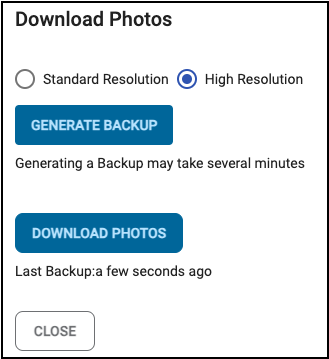
How does the host download photos?
Updated 2024-05-06
- As the host, logged into your LiveShare event, click the 3-dot menu in the top right.
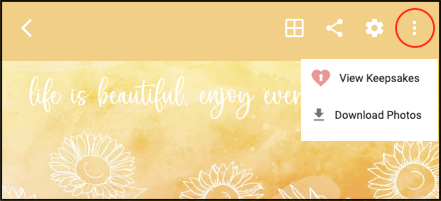
Click on ‘Download Photos’. Note, downloads are only available on the Standard, Premium and Premium Plus Events. Downloads are not available on a Trial account.
In the new pop-up window click the ‘Generate Backup’ button. This creates a zip file which reduces the file size for downloading. This may take a few seconds to a few minutes depending on the number of photos.
Click the ‘Download Photos’ button, once you see ‘Last Backup: a few seconds ago’. The zip file will download to your ‘Downloads’ folder by default.
Note you are limited in the number of backups each day. Please wait until all photos have been uploaded, to generate a backup. The number of backups is dependent on your Plan, and can be viewed by clicking ‘Details’ in the 3-dot menu in the top right.